Instant Launch
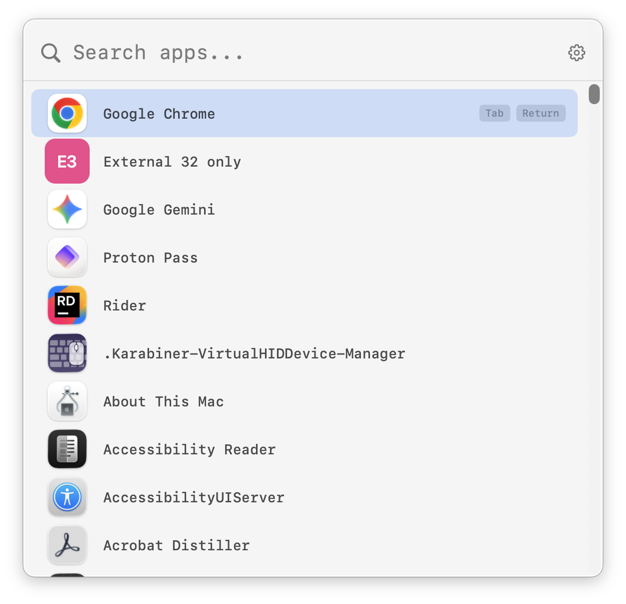
Press ⌃Space, ⌘Space or ⌥Space to summon the launcher. Register any number of custom hotkeys on top.

A fast, lightweight menu-bar app launcher for macOS.
Install with Homebrew:
brew tap amzu-ch/tap https://dev.azure.com/amzu-ch/Homebrew/_git/homebrew-tap
brew install --cask mlaunchy
Why MLaunchy
Press ⌃Space, ⌘Space or ⌥Space to summon the launcher. Register any number of custom hotkeys on top.
Alias prefix, name prefix, substring, acronym and fuzzy subsequence matching — find what you want with the fewest keystrokes.
Native SwiftUI app. Lives in your menu bar — no dock icon, no background bloat. Favorites, aliases and stats are stored on your Mac.
App Launcher
Search apps and Siri Shortcuts from one place, and reach 36 System Settings panes with one Tab. Favorites float to the top, aliases let you type "ff" for Firefox, and Tab lets you hand the query to the selected app.
Customization
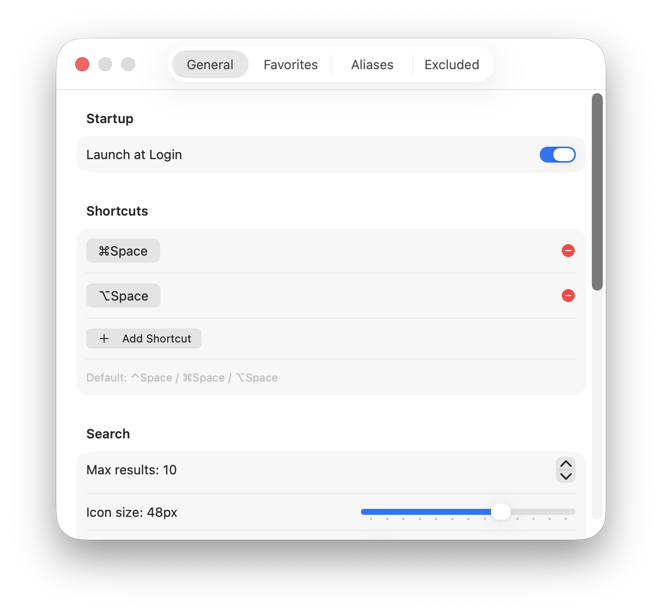
Tune icon size, row spacing and maximum number of results. The panel adapts its height to the settings you pick.
Record multiple trigger combos with a click. Ships with ⌃Space, ⌘Space and ⌥Space preconfigured.
Choose between 1, 5, 10, 30 and 60 minutes. FSEvents also re-indexes in real time when apps are added or removed.
One toggle in Settings enables automatic startup via macOS Service Management.
A dedicated Usage tab shows how many times you launched each app, shortcut or settings pane — with last-used timestamps. On by default, stored only on your Mac, and the Track launch statistics toggle is right at the top of the tab.
Works With
Select another amzu app in the launcher and press Tab. Instead of a web search, MLaunchy loads that app's action menu — filter by typing, arrow keys to select, Return to run. Each app publishes its action list through a provider manifest in ~/Library/Application Support/MLaunchy/providers/, which MLaunchy reads when it starts. No configuration, no plugins, no polling.
Select MShot, press Tab, and kick off a Full Screen, Window, Region, Scrolling or Timed capture without touching the menu bar. MShot must have run once before MLaunchy starts.
MExplorer writes its folder manifest in a newer format that MLaunchy doesn't read yet, so selecting MExplorer and pressing Tab does not show your folders for now.
Typing after the chevron narrows the action list the same way System Settings filtering does. Arrow keys select, Return launches.
Apps without a readable manifest keep the classic Tab behaviour. Malformed or newer-format manifests are silently skipped instead of breaking the launcher.
Install
MLaunchy.zip and unzip it./Applications folder.Under the Hood
Automatically detects and prevents duplicate instances. Only one MLaunchy runs at a time.
Favorites, aliases, excluded apps and extra folders stored as JSON in Application Support. Survive upgrades.
Favorites, aliases, excluded apps and launch statistics are stored on your Mac. No cloud sync; none of it is uploaded.
MLaunchy 1.4 sends crash reports to Sentry by default, plus app session events and recent app events (breadcrumbs) attached to crashes. No performance traces. From version 1.5, crash reports are off by default.
Settings → General → Privacy → Send crash reports disables Sentry with one click; the SDK shuts down immediately. Note: in 1.4, Reset All Settings turns it back on.
MLaunchy 1.4 checks amzu.ch for a new version at launch, at most once a day, and never downloads anything by itself. 1.4 has no switch for it; from 1.5 it is off by default with its own toggle.
Menu bar → "Report a Bug…" opens your mail client with version, build, macOS version, architecture, locale, indexed-app count and hotkeys prefilled.
Global hotkeys need no special permission. Key monitoring is used only while you record a new hotkey in Settings.
Point MLaunchy at any directory of .app bundles — perfect for portable apps or bundled development tools.
MLaunchy counts how many times you launched each app, shortcut or settings pane (on by default) — stored only on your Mac. Toggle the whole feature off in Settings → Usage any time.
MLaunchy is provided as is, without warranty of any kind, express or implied, including but not limited to warranties of merchantability, fitness for a particular purpose, or non-infringement.
In no event shall the authors or amzu solutions GmbH be liable for any claim, damages, data loss or other liability arising from the use of this software. You are responsible for evaluating whether MLaunchy is suitable for your environment before running it.
If this app saves you time, consider supporting its development.
Buy me a coffeeFound a bug? Use Menu Bar → Report a Bug… in MLaunchy, or email .